Buying Chemicals from Korea? Match the COA to the Lot Before Dispatch
Match Korean chemical supplier COAs to actual dispatch lots, distinguish specifications from SDS documents, request label evidence and manage missing-document follow-up with practical templates.
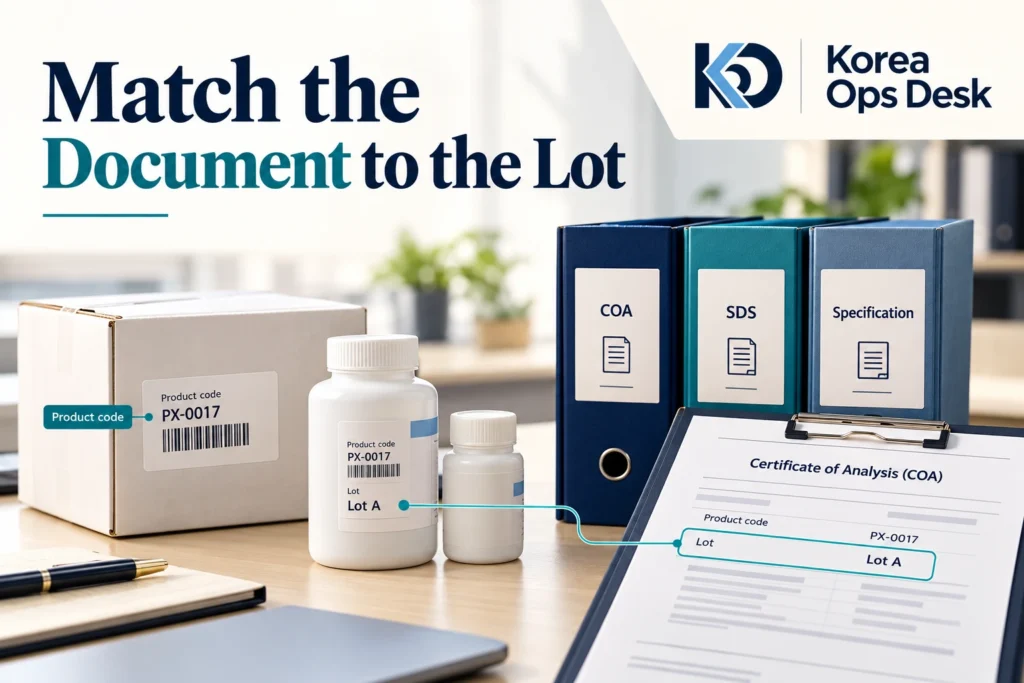
A Korean chemical supplier sends a PDF and says, “The certificate is attached.” Before your team approves dispatch, ask which product and which lot that document covers. A specification, a safety data sheet and a certificate of analysis answer different questions. Keeping all three connected to the actual order makes the purchase file useful to purchasing, quality, safety and logistics colleagues.
1. Understand what each document is supposed to answer
| Document | Main purchasing question | What it does not settle alone |
|---|---|---|
| Specification | Which product, grade and requirements are being agreed? | The results reported for a particular dispatch lot |
| COA: certificate of analysis | What analysis information is reported for the identified lot? | Every safety, transport or destination-market requirement |
| SDS: safety data sheet | What safety information applies to the supplied product? | Whether the lot meets your agreed quality requirements |
| Label and packing record | Which product and lots are physically allocated or packed? | The technical acceptance of the reported results |
Keep these as separate files with separate review statuses. “Documents received” is only a collection status. Your quality team may still need to review the COA, while the receiving team needs the SDS and the shipping contact needs the transport information. One green checkbox called “certificate” hides those different decisions.
DUKSAN, a Korean chemical manufacturer, provides separate specification, SDS and COA searches. Its COA page requests a lot number and tells users to confirm the manufacturer. This is a practical example of why a product name alone is not enough to organize the purchase file.
 Korea Ops Desk
Four connected records, four different questions
- 01
Specification
What did we agree to buy?
- 02
COA
What is reported for this lot?
- 03
SDS
What safety information applies?
- 04
Label and shipment
Which material is actually being sent?
2. Establish the exact product before requesting more certificates
Ask for the manufacturer, product name, product code, grade, concentration where relevant, pack size and quantity. Preserve any punctuation or suffix in the product reference. Similar chemical names can appear across different grades or formulations, and a distributor may sell products from several manufacturers.
| Identity field | What to record | Question when it differs |
|---|---|---|
| Manufacturer | Actual manufacturer named for the offered product | Is the seller a distributor and whose document is being supplied? |
| Product code | Complete manufacturer reference | Does the code include a pack-size suffix or another variant? |
| Name and grade | Exact offered designation | Is the proposed grade the one our technical team approved? |
| Concentration/form | Relevant product form or concentration | Does this document cover the supplied formulation? |
| Pack size and quantity | Units per container and number of containers | Does the quotation use the same unit basis? |
| Specification version | Document reference or revision/date | Which version forms the basis of the offer? |
If the buyer needs a particular impurity limit, test method or other application requirement, state it before ordering. Do not rely on a familiar grade name to communicate every requirement. Ask the supplier whether the requirement is covered by the standard specification, separately available or not offered, and obtain the technical reviewer’s decision.
When a supplier proposes another manufacturer or grade, treat it as an alternative offer. Obtain its own specification and SDS and compare it separately. Renaming an alternative in your spreadsheet to match the original request destroys the evidence of what changed.
3. Request the actual dispatch lot and its complete COA
During early quotation, a supplier may provide a representative certificate to show the report format. That can help technical review, but it is not the final dispatch-lot record. Ask whether the lot has been allocated to your order and when the corresponding certificate and label photographs can be supplied.
The Merck/Sigma-Aldrich document search uses the lot/batch number for COA retrieval, with the product number optional in the current search interface. It also explains how to identify product and lot numbers on labels. Follow the actual manufacturer’s search instructions; do not assume every portal uses the same code format.
- Ask the supplier to identify every lot allocated to the order.
- Obtain the complete COA for each lot, including continuation pages.
- Request readable product-label photographs showing the product reference and lot.
- Map the quantity and containers assigned to each lot.
- Compare the documents and labels with the approved product requirement.
- Record technical review and any question before approving the agreed dispatch stage.
| Order line | Allocated lot | Quantity | COA | Label | Review status |
|---|---|---|---|---|---|
| Product X / agreed grade | Lot A | [quantity] | Received: file reference | Photo reference | Quality review pending |
| Same product | Lot B | [quantity] | Requested | Photo reference | Document outstanding |
| Product Y | Not allocated | [quantity] | Representative only | Not available yet | Final lot confirmation due [date] |
This is an illustrative tracking format. Use the supplier’s actual lot identifiers and quantities. If several lots are supplied, do not assume that one certificate covers all of them because the product code is the same. Ask the supplier to explain any combined report or lot-reference convention clearly.
4. Read the COA against the requirement, not just the heading
Begin with identity: manufacturer, product code, grade and lot. Then have the responsible technical or quality reviewer compare the reported tests, methods, units, limits and results with the agreed requirement. A document entitled “Certificate of Analysis” can still leave a particular buyer requirement unanswered.
| Check | Question for review | Action if unclear |
|---|---|---|
| Identity | Does the COA correspond to the product and lot on the labels? | Ask for the correct file or a written explanation |
| Completeness | Are all pages and referenced attachments present? | Request the complete issued document |
| Tests and methods | Are the required characteristics and methods addressed? | Send specific missing-test questions |
| Units and limits | Are results being compared on the same basis? | Ask the technical reviewer to resolve the difference |
| Dates | What do the reported production, test, expiry or retest dates mean here? | Request the manufacturer’s applicable dating explanation |
| Issuer/version | Is this the current complete record supplied for the lot? | Clarify amendments and preserve the original history |
Do not turn “meets specification” into a statement that every possible use is suitable. The useful purchasing decision is whether the supplied evidence addresses the requirement your team actually approved. If an additional test is required, agree who will perform it, on which material, by which method and when the result will be available.
If a unit, decimal notation or translation is ambiguous, keep the original text and ask a focused question. Never silently “correct” an analytical result in a buyer summary. Record the clarification with the source document so another reviewer can see what was changed and why.
Korea Ops DeskA lot match starts the review; it does not finish it
- 01
Identity match
Product and lot agree
- 02
Complete report
All relevant pages received
- 03
Requirement comparison
Methods, limits, units and results reviewed
- 04
Decision record
Accepted points and unresolved questions
5. Obtain the supplier’s applicable SDS and route it to the right reviewers
KOSHA’s MSDS search guidance says the applicable sheet should be obtained from the party providing the chemical, such as its manufacturer, importer or seller, and describes its own database material as reference information. A generic database sheet should therefore not be substituted for the supplier’s document for the actual product.
The OSHA explanatory SDS briefing describes the sixteen-section format, including product/supplier identification in Section 1 and preparation or revision information in Section 16. It explains the safety, handling, storage and transport-related purpose of the sheet. Use it to navigate the document, while confirming the requirements for your actual destination and shipment.
- Request the current SDS for the exact manufacturer product and formulation.
- Confirm the language and destination-market format needed by the receiving team.
- Match the product identifier and supplier information to the order.
- Record the revision date or version and ask about any unexplained mismatch.
- Send the document to the appropriate safety/import and transport contacts before dispatch.
- Keep their outstanding questions separate from the quality review of the COA.
A Korean-language SDS may help your Korea-side discussion but may not be the final document your receiving operation requires. Ask for the applicable supplied version and any authorized translation needed. Do not rewrite hazard classifications or transport information yourself to make a document fit the destination.
6. Send one structured document request
Subject: Pre-dispatch documents: [product code / order reference]
Please confirm the documents and allocated material for order [reference].
Product: [manufacturer / full code / grade / concentration if applicable]
Quantity and pack size: [details]
Destination: [country]
Please provide:
1. The agreed specification and its current reference/version
2. The applicable SDS in [required language/market format]
3. Every lot allocated to this order and quantity per lot
4. The complete COA for each allocated lot
5. Readable label photographs linking the product code and lot
6. Any requested dating/storage information for this product
Please identify documents that are representative rather than final, and state when final lot documents will be available. Please notify us before changing the manufacturer, grade, product code or allocated lots.
Open technical questions: [specific list]
Thank you.
For a distributor, ask it to confirm the manufacturer before sending you a portal link. If the COA cannot be found online, send the label photograph and exact lot to the supplier and request the issued file. A search failure can arise from formatting, an incorrect reference or unavailable online records; it is a reason to clarify, not a reason to create a substitute certificate.
After a telephone explanation, request a written response tied to the product and lot. Keep the original manufacturer document alongside the English communication summary. Your reviewer should be able to distinguish the issued result from a salesperson’s interpretation.
7. Resolve mismatches and changes with a small action log
| Issue | Precise follow-up | Status to keep open |
|---|---|---|
| COA lot differs from label | Request the COA for the photographed lot or clarify the actual allocation | Lot-document match |
| Product code differs | Ask manufacturer/supplier to explain the relationship and exact supplied product | Product identity |
| Only representative COA supplied | Ask when actual lots will be assigned and final certificates issued | Dispatch evidence |
| Several lots, one COA | Request a lot-by-lot document map | Coverage of each lot |
| SDS for another grade | Request the sheet applicable to the supplied grade/formulation | Safety document |
| A required test is absent | Ask whether it is available and obtain the technical reviewer’s decision | Quality acceptance |
| Allocated lot changes | Obtain the new label/COA and repeat the relevant review | Change review |
Give each item an owner and next update date. For example: “Supplier sales contact to obtain the COA for Lot B from the manufacturer by [date]; quality team to review when received.” This makes the missing work visible without sending repeated requests for “all documents.”
If the supplier changes the allocated lot after review, update the file before dispatch. Do not keep the earlier approved certificate attached to the new shipment as if the material were unchanged. The product may be the same, but the lot-specific evidence is different.
Korea Ops DeskUse a short loop when a document is missing
- 01
Identify the gap
Exact product, lot and missing answer
- 02
Assign the request
Supplier or manufacturer contact
- 03
Receive the evidence
Complete file and written clarification
- 04
Review the change
Update the dispatch decision
8. Worked example: ten containers from two lots
A buyer orders ten containers of one chemical product. The supplier sends a COA for Lot A, but the packing allocation shows six containers from Lot A and four from Lot B. The product code matches throughout. The missing item is specific: the certificate and review for Lot B, not the entire order specification.
- Record both lots and their container quantities in the order file.
- Match the Lot A certificate to its labels and retain the completed review.
- Request the Lot B certificate and readable labels for the four allocated containers.
- Have the quality reviewer compare Lot B with the same agreed requirements.
- Confirm the applicable SDS remains the correct document for the supplied product.
- Check the final packed lot allocation before dispatch and retain the records for receiving.
At receipt, compare the delivered labels and lot quantities with the final allocation. Keep any discrepancy identifiable and contact the supplier with the relevant photographs and order reference. Your receiving team should not need to reconstruct the purchasing history from an unlabelled folder of PDFs.
Korea Ops Desk can organize the Korean-language follow-up when a manufacturer, distributor and overseas buyer are waiting on different pieces of information. We can pursue the exact missing file or answer, keep the lot mapping clear and return an English status record that your quality and purchasing teams can use.
Missing the correct COA, SDS or lot confirmation?
Send Korea Ops Desk the product reference and the documents received so far. We can contact your Korean supplier, request the lot-specific evidence and follow up the unresolved questions with a clear English status update.
Send us: Manufacturer and product code, grade, quantity, order reference, lot/label photos if available, destination and the exact missing documents or questions.
24/7 inquiries · colin@koreaopsdesk.com
Related practical guides
Expanded on 2 November 2026. Worked transactions and message templates are illustrative examples.